ARDUIN0 Kit With RFID And Bluetooth Compatible With Arduino IDE About
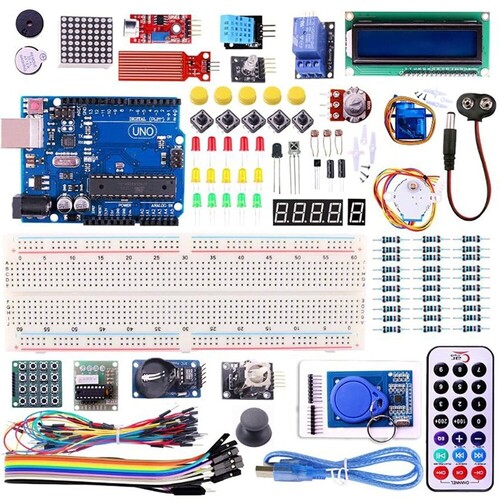
- 1 x Active Buzzer
- 1 x Passive Buzzer
- 1 x 8 X 8 Matrix
- 1 x Sound Sensor
- 1 x Water Level Sensor
- 1 x DHT11
- 1 x RGB LED Module
- 1 x Relay Module
- 1 x1602 Blue LCD
- 1 x UNO R3 Board
- 5 xT actile Switch With CAP
- 1 x Potentiometer
- 1 x SG90
- 5 x LED (RED, GREEN, YELLOW)
- 1 x IR Transmitter and Receiver
- 3 x LDR
- 1 x Transistor
- 1 x Vibration Sensor
- 1 x 9V DC jack
- 1 x 4 Digit 7 Segment Display
- 1 x 1 Digit 7 Segment Display
- 1 x Stepper motor
- 1 x 830 Point Bread board
- 30 x Resistor - 30 PCs
- 1 x Matrix Keypads
- 1 x ULN2003
- 1 x RTC Module
- 1 x Joystick Module
- 1 x RFID -
- 1 x IR Remote
- 1 x 65 Pcs Jumper
- 10 x Jumper wire (M-F)
- 1 x A-B USB Cable
Comprehensive ConnectivityWith both RFID and Bluetooth functionalities, this ARDUIN0 kit opens up exciting possibilities for contactless authentication, wireless data transfer, and remote device control. The presence of digital and analog interfaces allows seamless integration with various sensors and actuators, expanding your project potential.
User-Friendly and ReliableThanks to its compatibility with the Arduino IDE, users can quickly program and control the board using vast online resources and libraries. The external power supply ensures stability, while a 6-month warranty offers peace of mind regarding reliability and support.
FAQ's of ARDUIN0 Kit With RFID And Bluetooth Compatible With Arduino IDE:
Q: How do I set up the ARDUIN0 Kit with RFID and Bluetooth for my project?
A: To set up the kit, connect it to an external power source within the 12V to 24V range. Install the Arduino IDE on your computer, select the correct board, and use the USB interface to upload your code. Connect peripherals via the digital, analog, TWI, or SPI interfaces as needed.
Q: What applications can benefit from integrating both RFID and Bluetooth features?
A: Projects requiring secure identification (using RFID) and convenient wireless control (via Bluetooth) benefit greatly. Common uses include smart access control, wireless automation, asset tracking, and data logging systems.
Q: When should I use the digital I/O and when to use the analog input?
A: Use the digital I/O pins to control or read devices that have binary states, such as LEDs or switches. The analog input is ideal for reading variable signals from sensors like temperature or light sensors.
Q: Where is this ARDUIN0 Kit manufactured, and who distributes it?
A: This kit is manufactured in Taiwan and is available through a network of local distributors, exporters, importers, manufacturers, suppliers, traders, and wholesalers.
Q: What is the process for uploading code to the ARDUIN0 Kit?
A: First, write your program in the Arduino IDE. Select the appropriate board from the tools menu, connect the kit via USB, and click 'Upload.' Once complete, your program will run according to your instructions.
Q: What are the key benefits of using an external power supply with this kit?
A: An external power supply provides more stable and reliable voltage, important for minimizing device resets or failures when connecting multiple modules or sensors, especially in complex projects.
 Send Inquiry




 Send Inquiry


 Send Inquiry


 English
 Spanish
 French
 German
 Italian
 Chinese (Simplified)
 Japanese
 Korean
 Arabic
 Portuguese